DNS Lookup Published: 10 Sep, 2025
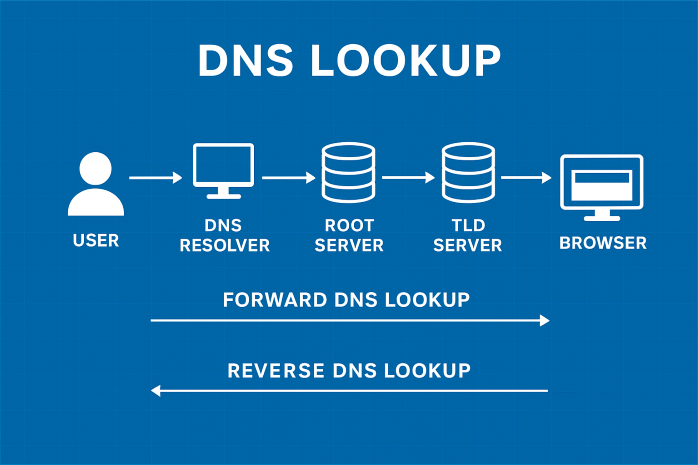
DNS Lookup: How the Internet Finds Websites
When you type a website address into your browser, have you ever wondered how your computer knows where to find that website? This seemingly simple action sets in motion a sophisticated process called DNS lookup—the internet's equivalent of a phone book that translates human-friendly domain names into machine-readable IP addresses.
The DNS lookup process connects human-readable domain names to server IP addresses
What is DNS Lookup?
DNS (Domain Name System) lookup is the process by which domain names (like www.example.com) are translated into IP addresses (like 192.168.1.1). This translation is necessary because while humans find it easier to remember names, computers and network devices use numbers to communicate with each other.
Think of DNS as the internet's phone book. Just as you look up a person's name to find their phone number, your computer uses DNS to look up a domain name to find the corresponding IP address. Without DNS, we would have to memorize countless numerical IP addresses to visit websites—an impractical proposition for most people.
"DNS is one of the most critical components of the internet infrastructure, yet it's largely invisible to most users. It's the silent workhorse that makes the web usable for humans." - Paul Mockapetris, inventor of DNS
How DNS Lookup Works: The Step-by-Step Process
The DNS lookup process involves multiple steps and several different servers working together to resolve a domain name. Here's what happens behind the scenes when you enter a URL in your browser:
1
Query Initiation
When you type a domain name into your browser, it first checks its local cache to see if it already knows the corresponding IP address. If not, it sends a query to the DNS resolver (typically provided by your ISP).
2
Recursive Resolver
The DNS resolver receives the query and checks its own cache. If it doesn't have the answer, it begins the process of recursively querying other DNS servers to find the IP address.
3
Root Name Server
The resolver first queries a root name server. These servers don't know the specific IP address but can direct the resolver to the appropriate Top-Level Domain (TLD) server based on the domain extension (.com, .org, .net, etc.).
4
TLD Name Server
The TLD server doesn't store the IP address either but can direct the resolver to the authoritative name servers for the specific domain.
5
Authoritative Name Server
Finally, the resolver queries the authoritative name server, which contains the actual DNS records for the domain. This server returns the IP address to the resolver.
6
Response to Client
The resolver sends the IP address back to your browser and caches it for future requests. Your browser can now establish a connection with the web server using the IP address.

The hierarchical structure of DNS servers ensures efficient domain name resolution
Types of DNS Queries
DNS lookup involves three types of queries that work together to resolve domain names:
1. Recursive Query
In a recursive query, the DNS client requires the DNS server to respond with either the requested resource record or an error message. The server must take on the workload of finding the answer by querying other servers if necessary.
2. Iterative Query
In an iterative query, the DNS server returns the best answer it can provide from its cache or zone data. If it doesn't have the exact answer, it may refer the client to a different DNS server that might know the answer.
3. Non-Recursive Query
This occurs when a DNS resolver queries a DNS server for a record that it has access to, either because it's authoritative for the record or because the record exists in its cache. The server doesn't need to query other servers to respond.
DNS Record Types: More Than Just IP Addresses
While the primary function of DNS is to translate domain names to IP addresses, DNS records contain various types of information:
- A Record: Maps a domain to an IPv4 address
- AAAA Record: Maps a domain to an IPv6 address
- CNAME Record: Creates an alias from one domain to another
- MX Record: Directs email to mail servers
- TXT Record: Contains text information for various purposes
- NS Record: Specifies authoritative name servers for the domain
- SOA Record: Stores administrative information about the domain
Why DNS Lookup Speed Matters
DNS lookup time directly affects website loading speed. Studies show that:
- A 100ms delay in DNS lookup can reduce conversion rates by 7%
- DNS resolution typically accounts for 10-20% of total website load time
- Faster DNS can improve overall user experience and SEO rankings
To optimize DNS performance, many organizations use DNS caching, Content Delivery Networks (CDNs), and premium DNS services that offer faster resolution times.
"DNS performance is a critical component of web performance. Shaving milliseconds off DNS lookup times can have a measurable impact on user experience and business metrics." - Web Performance Research
Common DNS Issues and Troubleshooting
DNS problems can prevent users from accessing websites and services. Common issues include:
1. DNS Propagation Delays
When you change DNS records, it takes time for these changes to propagate across all DNS servers worldwide. This process can take anywhere from a few minutes to 48 hours.
2. DNS Cache Poisoning
Also known as DNS spoofing, this attack involves corrupting DNS cache data to redirect users to malicious websites.
3. DNS Server Outages
If your DNS server experiences downtime, you won't be able to resolve any domain names, effectively cutting off your internet access.
4. Incorrect DNS Settings
Misconfigured DNS records can make websites inaccessible or cause email delivery problems.

Troubleshooting DNS issues requires understanding of the lookup process
Tools for DNS Lookup and Diagnostics
Several tools can help you diagnose DNS issues and understand the lookup process:
- nslookup: A command-line tool available on most operating systems for querying DNS servers
- dig: A powerful DNS lookup utility popular among network administrators
- WHOIS lookup: Provides registration information about a domain name
- Online DNS lookup tools: Web-based tools like DNSChecker, MXToolbox, and What's My DNS
Conclusion
DNS lookup is a fundamental process that makes the internet accessible and user-friendly. By translating human-readable domain names into machine-readable IP addresses, DNS serves as the internet's phone book, quietly working behind the scenes every time we visit a website or send an email.
Understanding how DNS lookup works can help you troubleshoot connectivity issues, optimize website performance, and appreciate the sophisticated infrastructure that powers our digital world. As internet technology continues to evolve with the adoption of IPv6, DNSSEC, and other advancements, DNS will remain a critical component of global connectivity.
Whether you're a casual internet user or a network administrator, having a basic understanding of DNS lookup empowers you to navigate the digital landscape more effectively and resolve issues that might otherwise seem mysterious.